
Scanned Burmese in.Unicode text out.
စကင်ဖတ်ထားတဲ့ မြန်မာစာမှ Unicode စာသားသို့
LEXO is a free desktop app that turns PDFs and images into clean, editable text, with Burmese as its first language. Crop and split the pages, run Google Docs OCR through your own Google account, proofread each page beside its image, then export.
Install
uv tool install lexo pipx install lexo python -m pip install lexo then
lexo gui 

- Free and open source
- Windows · macOS · Linux
- Python 3.11+
- AGPL-3.0
- v0.4.1
Scan to text in 47 seconds
A short animated overview. Music only, no narration.
What stays on your computer, and what doesn't
LEXO is local-first, not offline. Everything except Google Docs OCR runs on your machine. When you choose OCR, this is exactly what happens.
On your computer
- Opening PDFs, images, and image sets
- Cropping, splitting, rotating, merging, and reordering pages
- Reading the embedded text layer of digital PDFs
- Proofreading and editing the text
- Exporting TXT, Markdown, and JSONL
Through your own Google account
Only when you pick Google Docs OCR
- Each page is rendered to an image and uploaded to your Google Drive
- Google Docs OCR reads it; LEXO downloads the text
- LEXO deletes the temporary Drive file right after
- Access is limited to the
drive.filescope: only files LEXO itself created - Your sign-in token lives in the OS keychain;
lexo logoutremoves it
OCR needs a one-time Google Cloud setup: a project, the Drive API, an OAuth consent screen, and a credentials.json file. It's six steps, and the first walkthrough video shows all of them. Read the setup guide
One document, start to finish
LEXO works like an editor, not an upload box. Your original file is untouched until you save.
-
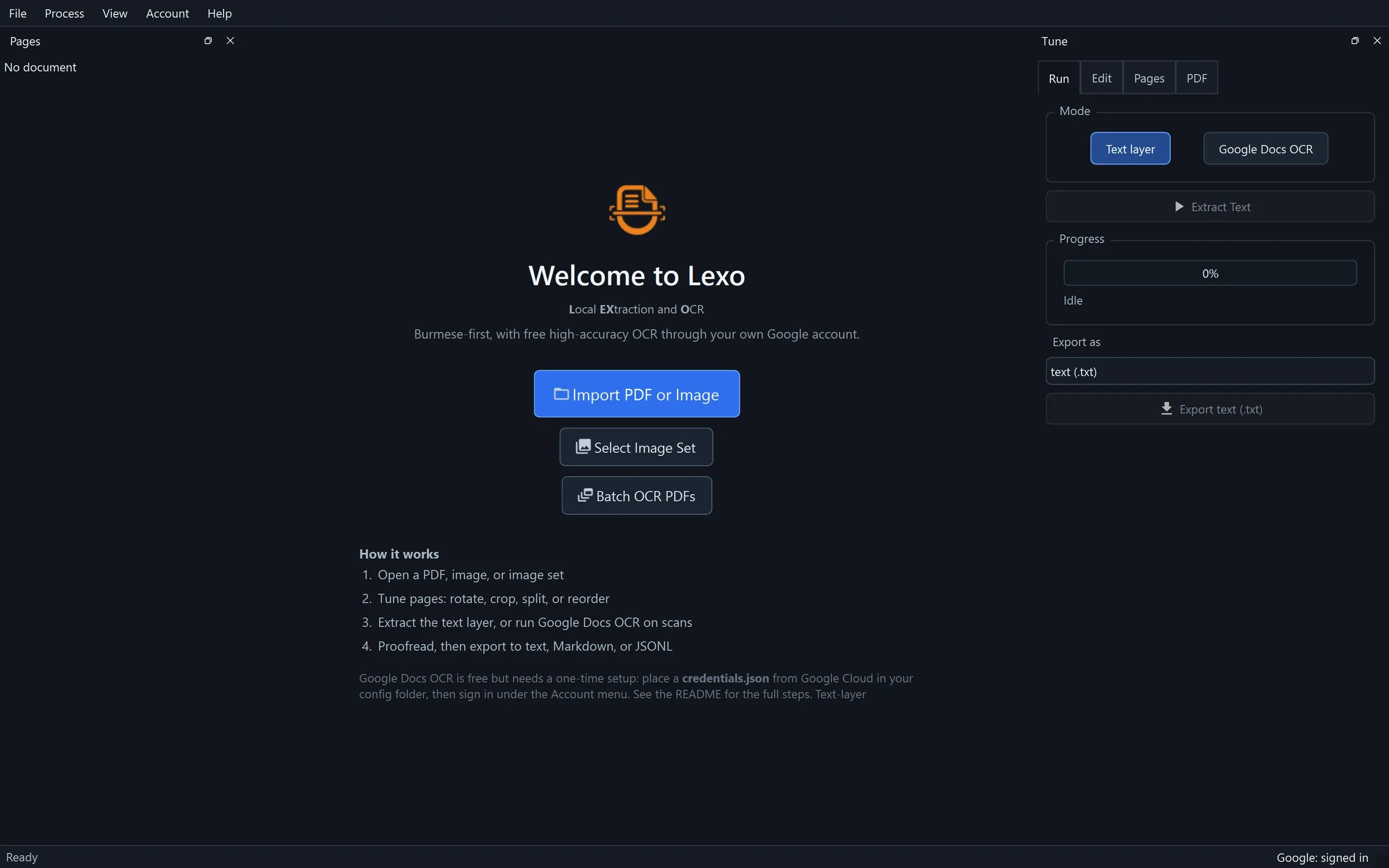
Open
Open a PDF, a single image, or a set of images. Digital and scanned pages can live in the same document.
-
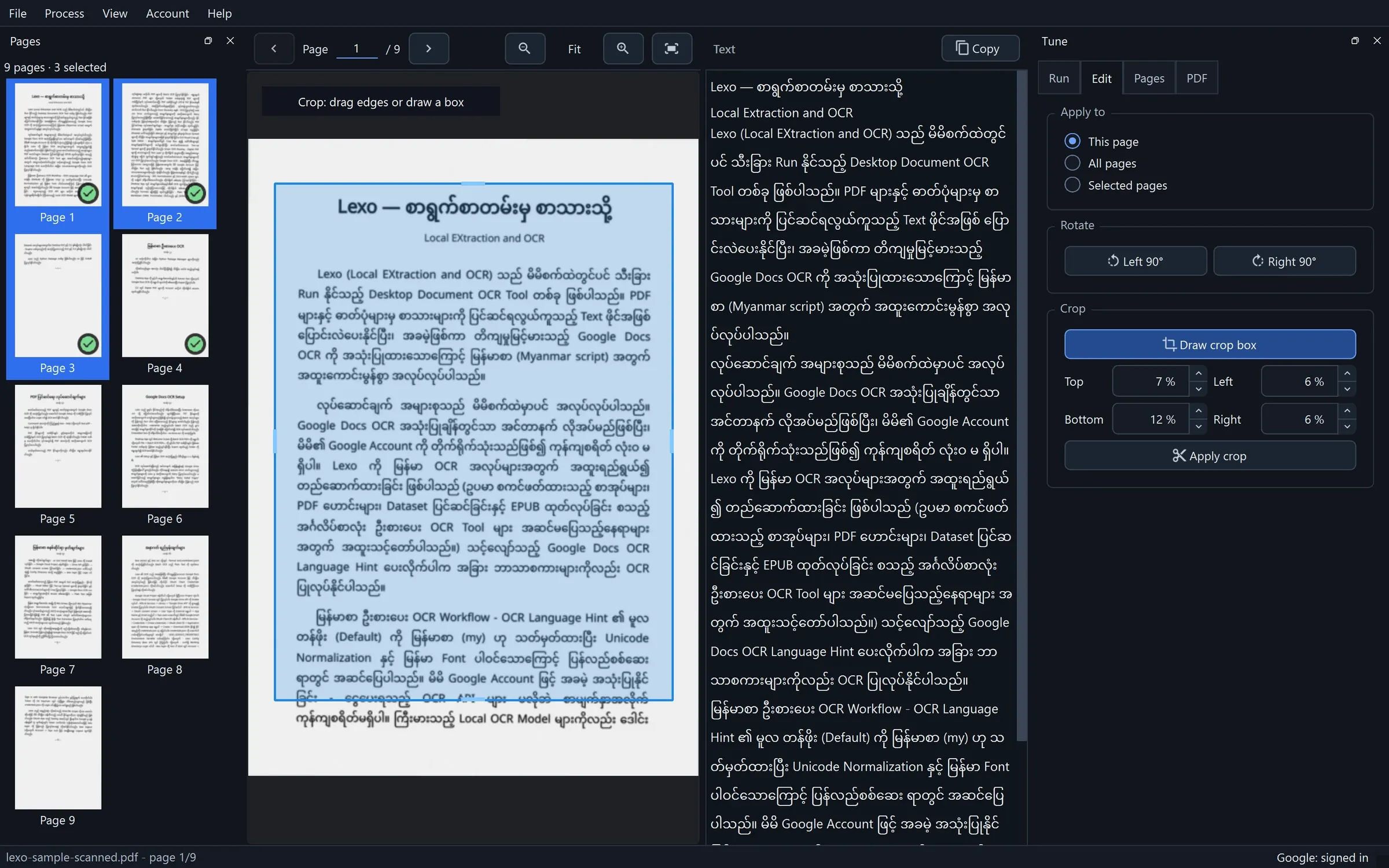
Tune the pages
Drag a crop box over the page to drop running heads and page numbers. Drag a line to split two-up spreads. Rotate, reorder, or delete pages for this page, all pages, or a selection.
-
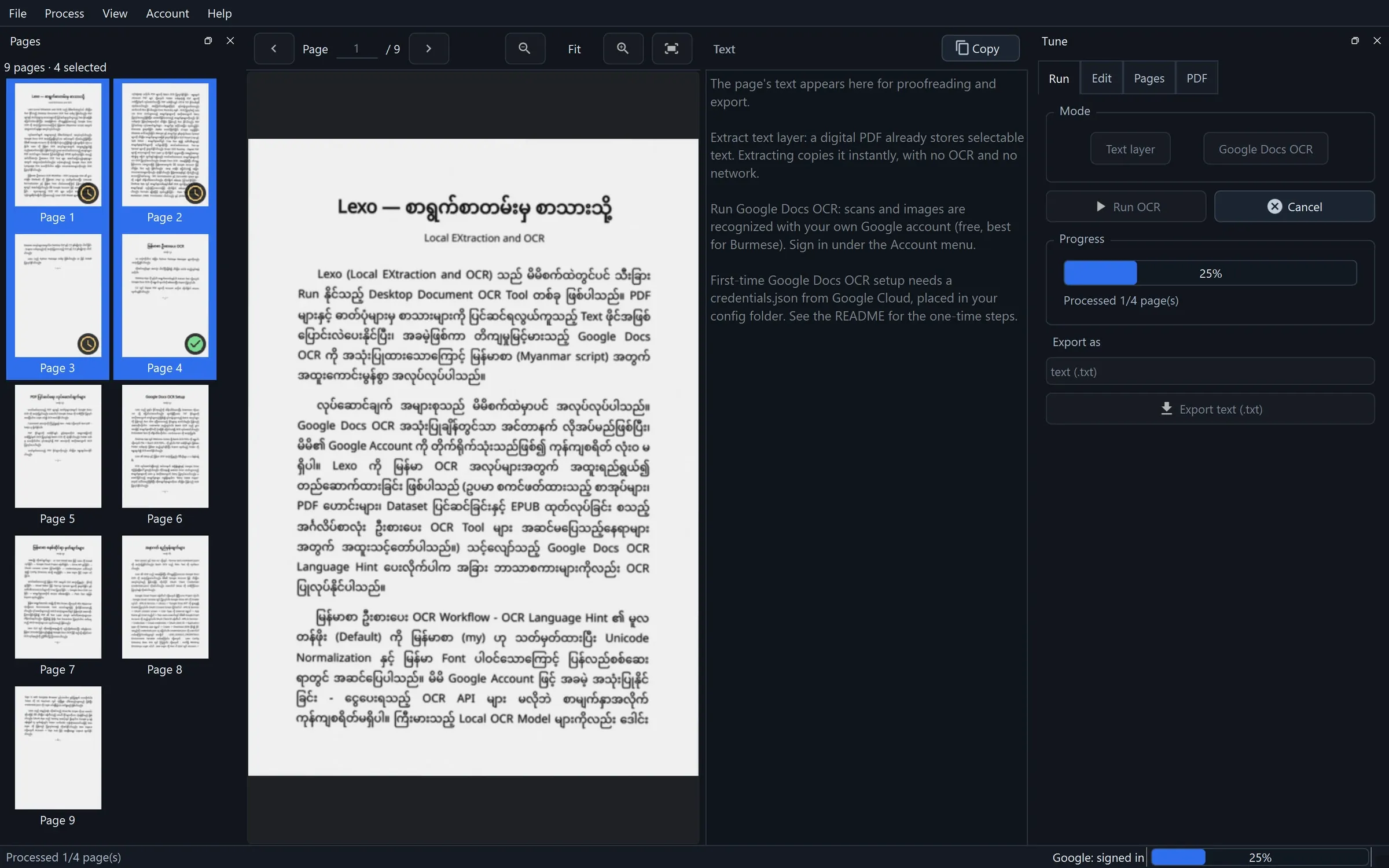
Run
Text layer copies the text a digital PDF already has: instant and lossless. Google Docs OCR reads scans. Pages report back one by one; transient failures retry, and Retry Failed Pages re-runs only what failed.
-
Proofread
Every page sits beside its editable text, so you fix what the text layer or OCR got wrong right where you see it. The Myanmar font is bundled, so Burmese renders correctly even on machines without one.
နိုိုင်နိုင်A doubled vowel sign from a PDF text layer, corrected in LEXO's text pane. 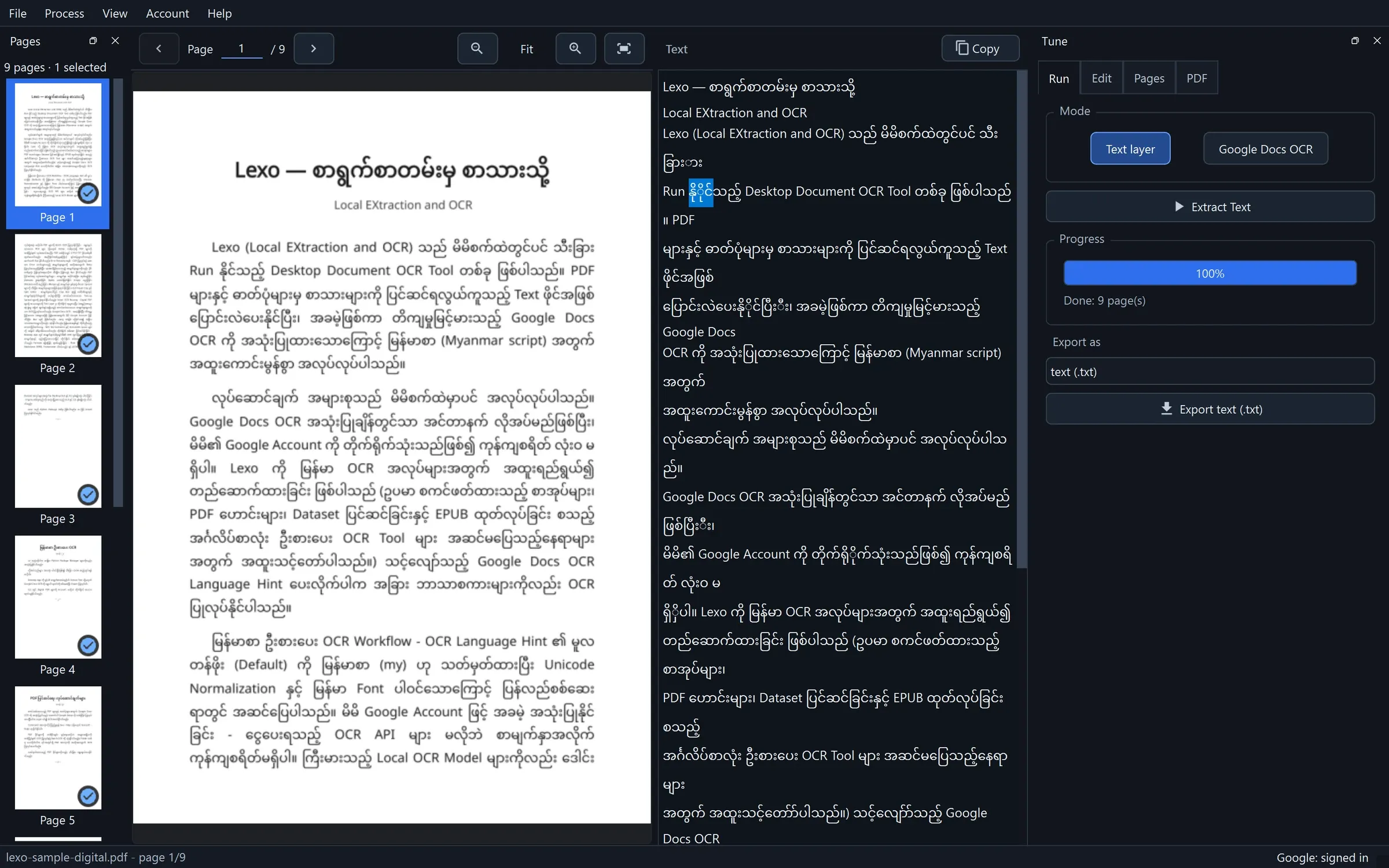
-
Export
Plain text, Markdown with YAML frontmatter, or JSONL with one record per page for NLP and LLM work.
lexo-sample-digital.md
---
source: "lexo-sample-digital.pdf"
doc_id: "e2bd21cca7cdcefd5ed317ad90776f845d8934ca763010fce8e6fba0e5562e30"
page_count: 9
extracted_at: "2026-10-22T06:59:36.604240+00:00"
---

## Page 1

Lexo — စာရွက်စာတမ်းမှ စာသားသို့
Local EXtraction and OCR
Lexo (Local EXtraction and OCR) သည် မိမိစက်ထဲတွင်ပင် သီးခြား
Run နိုင်သည့် Desktop Document OCR Tool တစ်ခု ဖြစ်ပါသည်။ PDF
များနှင့် ဓာတ်ပုံများမှ စာသားများကို ပြင်ဆင်ရလွယ်ကူသည့် Text ဖိုင်အဖြစ်
ပြောင်းလဲပေးနိုင်ပြီး၊ အခမဲ့ဖြစ်ကာ တိကျမှုမြင့်မားသည့် Google Docs
OCR ကို အသုံးပြုထားသောကြောင့် မြန်မာစာ (Myanmar script) အတွက်
အထူးကောင်းမွန်စွာ အလုပ်လုပ်ပါသည်။
လုပ်ဆောင်ချက် အများစုသည် မိမိစက်ထဲမှာပင် အလုပ်လုပ်ပါသည်။
Google Docs OCR အသုံးပြုချိန်တွင်သာ အင်တာနက် လိုအပ်မည်ဖြစ်ပြီး၊
မိမိ၏ Google Account ကို တိုက်ရိုက်သုံးသည်ဖြစ်၍ ကုန်ကျစရိတ် လုံးဝ
မရှိပါ။ Lexo ကို မြန်မာ OCR အလုပ်များအတွက် အထူးရည်ရွယ်၍
တည်ဆောက်ထားခြင်း ဖြစ်ပါသည် (ဥပမာ စကင်ဖတ်ထားသည့် စာအုပ်များ၊
PDF ဟောင်းများ၊ Dataset ပြင်ဆင်ခြင်းနှင့် EPUB ထုတ်လုပ်ခြင်း စသည့်
အင်္ဂလိပ်စာလုံး ဦးစားပေး OCR Tool များ အဆင်မပြေသည့်နေရာများ
အတွက် အထူးသင့်တော်ာ်ပါသည်။) သင့်လျော်သည့် Google Docs OCR
Language Hint ပေးလိုက်ပါက အခြား ဘာသာစကားများကိုလည်း OCR
ပြုလုပ်နိုင်ပါသည်။
မြန်မာစာ ဦးစားပေး OCR Workflow - OCR Language Hint ၏ မူလ
တန်ဖိုး (Default) ကို မြန်မာစာ (my) ဟု သတ်မှတ်ထားပြီး Unicode
Normalization နှင့် မြန်မာ Font ပါဝင်သောကြောင့် ပြန်လည်စစ်ဆေး
ရာတွင် အဆင်ပြေပါသည်။ မိမိ Google Account ဖြင့် အခမဲ့ အသုံးပြုနိုင်
ခြင်း - ငွေပေးရသည့် OCR API များ မလိုဘဲ စာမျက်နှာှာအလိုက်
ကုန်ကျစရိတ်မရှိပါ။ ကြီးမားသည့် Local OCR Model များကိုလည်း ဒေါင်း
Page 1 of the Markdown LEXO exported after that correction, unedited. 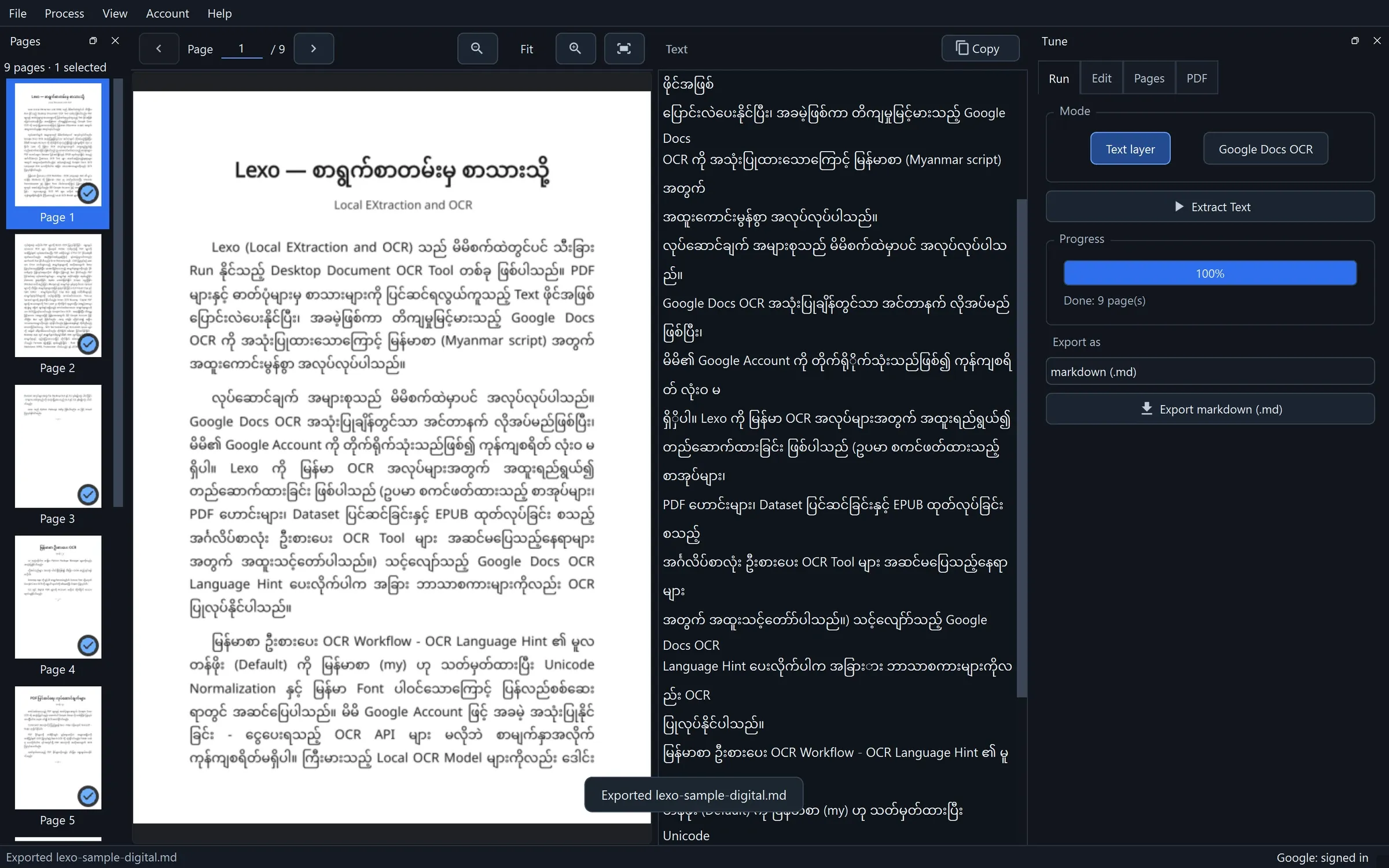


Made for Myanmar script
Many OCR tools are built around Latin script and treat Burmese as an afterthought. LEXO starts from Burmese.
- Burmese by default
- The OCR language hint is my unless you say otherwise. Pass --lang, or LEXO_OCR_LANGUAGE, for another language.
- Unicode that stays correct
- Text is normalized to NFC. Zero-width spaces, which mark Burmese word and line breaks, are kept; stray control characters are dropped.
- Legacy text layers, recognized
- Layers made of Private Use Area glyphs are detected as unusable and sent to OCR. ASCII-mapped fonts like Win Innwa come out as Latin letters: switch to Google Docs OCR and LEXO reads the page as an image instead.
- မ U+1019
- ◌ြ U+103C
- န U+1014
- ◌် U+103A
- မ U+1019
- ◌ာ U+102C

A folder of PDFs, one text file each
Point LEXO at a folder or a handful of PDFs. Each source becomes a UTF-8 .txt with the same name. Files that already exist are skipped, so a stopped batch picks up where it left off.
lexo ocr-batch ./pdfs --out-dir ./txt - Resumable: existing outputs are skipped unless you pass --overwrite
- Every page is OCR'd by default; --no-force-ocr keeps usable embedded text
- In the app: Batch OCR PDFs on the welcome screen, or Ctrl+Alt+O

PDF tools that never need a sign-in
The same engine runs from the command line. None of these touch the network.
- Pull out a page range
-
lexo pdf extract book.pdf --pages "1-3,7,10-" -o subset.pdf - Split into ten-page files
-
lexo pdf split book.pdf --every 10 - Trim 8% off top and bottom
-
lexo pdf crop book.pdf --top 8 --bottom 8 -o trimmed.pdf - Split two-up spreads in half
-
lexo pdf split-spread scans.pdf -o pages.pdf - Rotate pages
-
lexo pdf rotate book.pdf -d 90 -o rotated.pdf - Merge files in order
-
lexo pdf merge a.pdf b.pdf -o book.pdf
See the whole thing in three minutes
Three short, silent walkthroughs with on-screen captions, recorded in the real app.
OCR a scanned Burmese PDF in the desktop app
Open the file, split two-up spreads and crop margins in the visual editor, run Google Docs OCR, review each page, export plain text.
Length 0:37 · No sound; on-screen captions.
Install with uv and the one-time Google Cloud setup
uv tool install lexo, a Google Cloud project, the Drive API, the OAuth consent screen, credentials.json in the config folder, then lexo login.
Length 1:34 · No sound; on-screen captions.
Legacy-font PDFs: getting real Burmese text
Win Innwa and similar fonts store Burmese as ASCII letters. Spot the case in the text pane, switch to Google Docs OCR, and get Myanmar Unicode back.
Length 0:45 · No sound; on-screen captions.
Free, open source, and yours to run
LEXO is licensed under the AGPL-3.0. There is no account, no subscription, and no per-page fee. Google Docs OCR is free through your own Google account. The desktop app and the CLI drive the same engine, so a workflow you prove in the GUI can be scripted.
Install LEXO
One Python package carries the CLI and the desktop app. No separate system dependencies.
Read the docs